Speed Up Your Sports Illustrations with a Football Soccer Procreate Brush Stamp
If you have ever tried to draw a realistic soccer ball from scratch in Procreate, you know the struggle. Getting the curvature of the panels right, maintaining consistent perspective, and ensuring the shading looks natural can turn a quick sketch into a hours-long frustration. This is exactly where a dedicated Football soccer Procreate Brush Stamp changes the game. It is not about cheating; it is about efficiency. For digital artists, sports bloggers, and content creators working on an iPad or iPhone, this tool removes the repetitive technical hurdles so you can focus on composition, storytelling, and style.
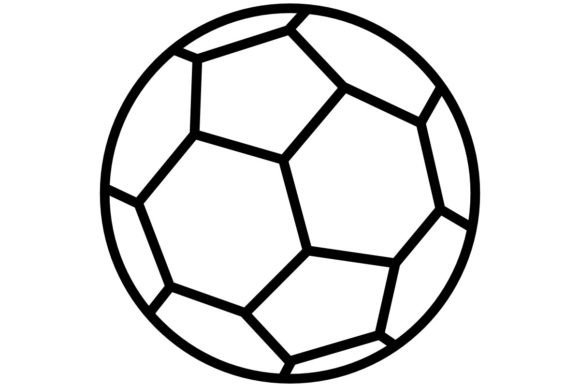
A brush stamp is essentially a pre-designed graphic that acts as a single brush stroke. Instead of drawing every line of a hexagon and pentagon pattern manually, you tap the screen, and a perfectly rendered soccer ball appears. But the utility goes far beyond just placing a single object. When used correctly, these stamps become versatile assets for backgrounds, textures, and dynamic action scenes.
Why Digital Artists Are Switching to Stamp Brushes
The primary benefit of using a Football Soccer Ball Procreate brush stamp is time management. In professional settings, deadlines are tight. Whether you are creating social media graphics for a local league, designing merchandise for a sports brand, or illustrating a children’s book about athletics, speed matters. A stamp brush allows you to populate a scene in seconds rather than minutes.
Beyond speed, consistency is key. When you need multiple balls in a single illustration—perhaps showing a training drill or a chaotic match scene—drawing each one by hand often leads to slight variations in size and shape. A stamp ensures uniformity. You can scale them up or down, rotate them to match the action, and adjust their opacity to create depth, all while keeping the core design identical. This level of precision is difficult to achieve freehand, especially when working on the smaller screen of an iPhone using Procreate Pocket.
Real-World Use Cases for Creators and Businesses
Understanding where to use these brushes helps unlock their full potential. Here are several practical scenarios where a football stamp brush adds immediate value:
- Social Media Content Creation: Sports marketers and influencers need fresh visuals daily. You can quickly create engaging stories or posts by scattering soccer balls in the background of text-based announcements. Add a few stamped balls behind a "Game Day" headline, lower the opacity, and you have an instant, thematic backdrop that doesn’t distract from the message.
- Educational Materials: Coaches and physical education teachers often create digital playbooks or instructional guides. Using a Football soccer Procreate Brush Stamp allows you to diagram drills clearly. You can place player icons and then stamp balls to show passing routes, making the visual aid clean and easy to understand for young athletes.
- Merchandise Design: If you run a small business selling custom t-shirts, mugs, or stickers, these brushes are invaluable. You can create seamless patterns by scattering the stamps across a canvas. Rotate them at different angles to avoid a rigid grid look, resulting in a dynamic fabric print that appeals to soccer fans.
- Journaling and Scrapbooking: For hobbyists who use Procreate for digital planning, adding thematic elements makes pages pop. If you are documenting a weekend tournament or a child’s sports season, dropping in a few stylized soccer balls adds context and visual interest without requiring advanced drawing skills.
Creating Depth: Foreground vs. Background Techniques
One common mistake beginners make is using stamps flatly. To make your artwork look professional, you must treat the stamp as a flexible element, not a static sticker. The Football Soccer Ball Procreate brush stamp can be manipulated to serve different spatial roles.
For backgrounds, use the scatter function if available, or manually place multiple stamps. Reduce the opacity to 20–30% and blur them slightly using the Gaussian Blur tool. This creates a sense of atmosphere and motion, suggesting a stadium filled with balls or a dynamic energy field. It adds texture without competing with your main subject.
For the foreground, keep the stamps sharp and high-contrast. Use the transform tool to rotate the ball so the panel lines align with the perspective of your scene. If a player is kicking the ball, ensure the rotation suggests movement. Adding a subtle shadow beneath the stamped ball grounds it in the scene, preventing it from looking like it is floating awkwardly above the canvas.
Choosing the Right Stamp for Your Style
Not all brush stamps are created equal. Before downloading or purchasing a Football soccer Procreate Brush Stamp, consider the artistic style you aim to achieve. Some stamps are hyper-realistic, featuring detailed stitching and leather textures. These are ideal for commercial illustrations or realistic portraits. Others are minimalist or cartoonish, using bold lines and flat colors. These work better for icons, logos, or playful educational content.
Also, check the resolution. Since you may be using this on both iPad and iPhone via Procreate Pocket, ensure the brush asset is high-quality. A low-resolution stamp will pixelate when scaled up, ruining the professionalism of your work. Look for brushes that allow for color customization. The ability to change the ball’s color from traditional black-and-white to team-specific hues directly within Procreate saves significant post-processing time.
Tips for Seamless Integration
To get the most out of your tool, integrate it into your workflow thoughtfully. Do not rely on the stamp alone. Combine it with hand-drawn elements. For instance, stamp the ball, then use a standard pencil brush to add motion lines or impact sparks around it. This hybrid approach retains the speed of the stamp while adding the unique, human touch of hand-drawing.
Experiment with layer modes. Placing a soccer ball stamp on a layer set to "Multiply" can help it blend into textured backgrounds, making it look like part of the environment rather than an overlay. Conversely, using "Screen" or "Add" can create glowing, energetic effects suitable for dynamic promotional graphics.
Ultimately, a Football soccer Procreate Brush Stamp is more than a shortcut; it is a creative enabler. It lowers the barrier to entry for complex sports illustrations, allowing educators, entrepreneurs, and artists to communicate their passion for the game with clarity and speed. By understanding how to manipulate these stamps for depth, context, and style, you transform a simple tool into a cornerstone of your digital art toolkit.