Unlocking the Magic of Moroccan Nights Procreate Color Palette for Digital Artists
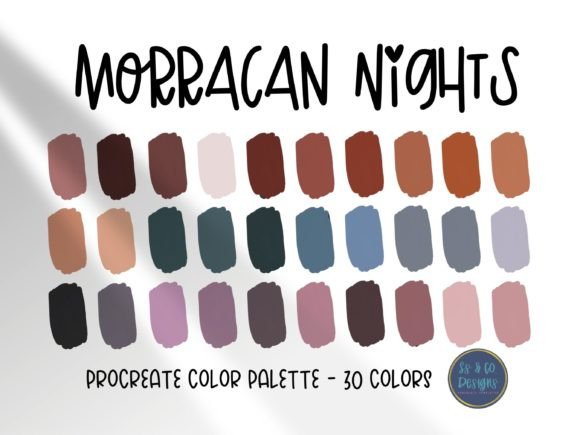
Digital illustration is as much about mood and atmosphere as it is about line work and composition. One of the quickest ways to elevate a piece from amateur to professional is through thoughtful color selection. This is where curated tools like the Moroccan Nights Procreate Color Palette become indispensable assets for creators. Designed specifically for the iPad’s most popular drawing app, this collection offers thirty beautiful, hand-selected colors that capture the essence of twilight markets, intricate tile work, and the warm glow of lantern light.
However, simply downloading a palette is not a guarantee of better art. Many artists, from enthusiastic beginners to seasoned freelancers, fall into common traps when integrating new color sets into their workflow. Understanding how to properly utilize these pre-selected hues can save you significant time and prevent the frustration of muddy, discordant results.
The Allure of Curated Color Sets
The primary value proposition of the Moroccan Nights palette is efficiency. When you are working against a deadline for a client or trying to capture a fleeting idea, spending twenty minutes mixing shades on the color wheel is often counterproductive. These thirty colors have been balanced to work harmoniously together. They include deep indigos, vibrant terracottas, rich golds, and soft sandy neutrals. By removing the guesswork, the palette allows you to focus on storytelling and technique rather than color theory mechanics.
For marketers, bloggers, and small business owners who create their own social media graphics, consistency is key. Using a cohesive palette ensures that your brand visuals remain recognizable across different platforms. The exotic yet grounded tones of this specific set are particularly effective for projects requiring warmth, mystery, or cultural depth.
Common Mistakes When Using Pre-Selected Palettes
While the intention behind using a tool like the Moroccan Nights Procreate Color Palette is to streamline creation, several misunderstandings can hinder your progress. Recognizing these pitfalls early can dramatically improve your output quality.
Ignoring Value Contrast
A frequent error is assuming that because colors come from the same palette, they will automatically look good together in every combination. This is false. The Moroccan Nights palette is rich in saturation, but if you select three mid-tone colors with similar brightness levels, your artwork will lack depth. It may appear flat or muddy, regardless of how beautiful the individual hues are.
Better Approach: Before starting your sketch, map out your light and dark areas. Use the deepest blues or purples from the palette for shadows and the brightest golds or creams for highlights. Ensure there is a clear distinction in value, not just hue, to maintain visual interest.
Overlooking System Requirements
It sounds trivial, but many users attempt to download or import files without verifying their software compatibility. You must have the Procreate app installed on your iPad to use this file. It is not compatible with Photoshop, Clip Studio Paint, or desktop versions of drawing software. Attempting to force these files into other programs leads to confusion and wasted time.
Better Approach: Check your app version before purchasing or downloading. Ensure you are comfortable with the basic interface of Procreate. If you are new to the platform, take ten minutes to review the official handbook regarding file management to avoid technical hurdles.
Failure to Customize
Some artists treat curated palettes as rigid rules rather than starting points. They may feel constrained by the thirty colors provided, believing they cannot add their own shades. This limits creativity. The Moroccan Nights palette is designed to inspire, not restrict.
Better Approach: Use the thirty colors as your base layer. Feel free to mix them with white or black within Procreate to create tints and shades that fit your specific lighting conditions. You can also duplicate the palette and add complementary colors if your project requires a pop of green or pink that isn’t included in the original set.
How to Import and Organize Your Palette
Proper installation is crucial for a smooth workflow. If you do not know how to import palettes into the Procreate application, the file will sit unused in your downloads folder. The process is straightforward but requires attention to detail.
- Download the .swatches file to your iPad.
- Open Procreate and create a new canvas.
- Tap the color circle in the top right corner to open the color panel.
- Select the "Palettes" tab at the bottom.
- Tap the plus icon or "Import" button and select the downloaded file.
Once imported, rename the palette to something easily searchable, such as "Moroccan Nights," so you can locate it quickly among your other collections. For professionals managing multiple clients, keeping palettes organized is essential for maintaining efficiency.
Evaluating Suitability for Your Project
Before committing to this palette for a major project, ask yourself if the aesthetic aligns with your goals. The Moroccan Nights theme is inherently warm and atmospheric. It is perfect for illustrations involving travel, history, fantasy, or cozy interior scenes. However, it may not be the best choice for a high-tech sci-fi concept or a sterile corporate infographic unless used very sparingly as an accent.
Consider your audience. If you are an educator creating materials for children, the rich, dark tones might need to be lightened significantly to remain engaging and accessible. For entrepreneurs selling luxury goods, the deep jewel tones can convey elegance and exclusivity effectively.
Maximizing Inspiration and Creativity
Let the colors inspire your creation rather than dictating it. Start with a simple shape or silhouette and fill it with colors from the palette to see how they interact. Notice how the terracotta vibrates against the deep blue, or how the gold accents draw the eye. This experimental phase is low-stakes and high-reward.
Many creators overlook the psychological impact of color. The hues in this set evoke feelings of warmth, nostalgia, and adventure. Use this emotional resonance to strengthen the narrative of your artwork. If you are designing a book cover, these colors can signal a genre of historical fiction or magical realism to potential readers instantly.
Final Considerations for Digital Creators
Investing in quality resources like the Moroccan Nights Procreate Color Palette is a smart move for any digital artist. It reduces decision fatigue and provides a professional foundation for your work. However, the tool is only as good as the hand that wields it. Avoid the trap of passive usage. Engage with the colors, test their limits, and integrate them thoughtfully into your unique style.
Remember to check the Procreate handbook for detailed instructions on importing and managing assets if you encounter any technical difficulties. By combining these beautiful, hand-selected colors with solid artistic principles, you can create stunning visuals that resonate with your audience and stand out in a crowded digital landscape. Whether you are a hobbyist exploring new styles or a freelancer delivering client work, this palette offers a reliable, inspiring resource for your next creative endeavor.